
GitHub CI recipes
Basic example
Section titled “Basic example”This recipe demonstrates how to set up an automated workflow that will check all repository links on push.
name: Links
on:  push:
jobs:  linkChecker:    runs-on: ubuntu-latest    steps:      - uses: actions/checkout@v5      - name: Link Checker        id: lychee        uses: lycheeverse/lychee-action@v2        with:          format: "markdown"          args: ". --verbose"
Pull request comment
Section titled “Pull request comment”sticky-pull-request-comment is a practical way to display lychee’s results on a pull request using a sticky comment.
name: Check links
on:  pull_request:    types: [opened, synchronize, reopened]
jobs:  check-links:    runs-on: ubuntu-latest    steps:      - uses: actions/checkout@v5      - uses: lycheeverse/lychee-action@v2      - name: Comment broken links        uses: marocchino/sticky-pull-request-comment@v2        with:          path: lychee/out.md
Annotate link check errors
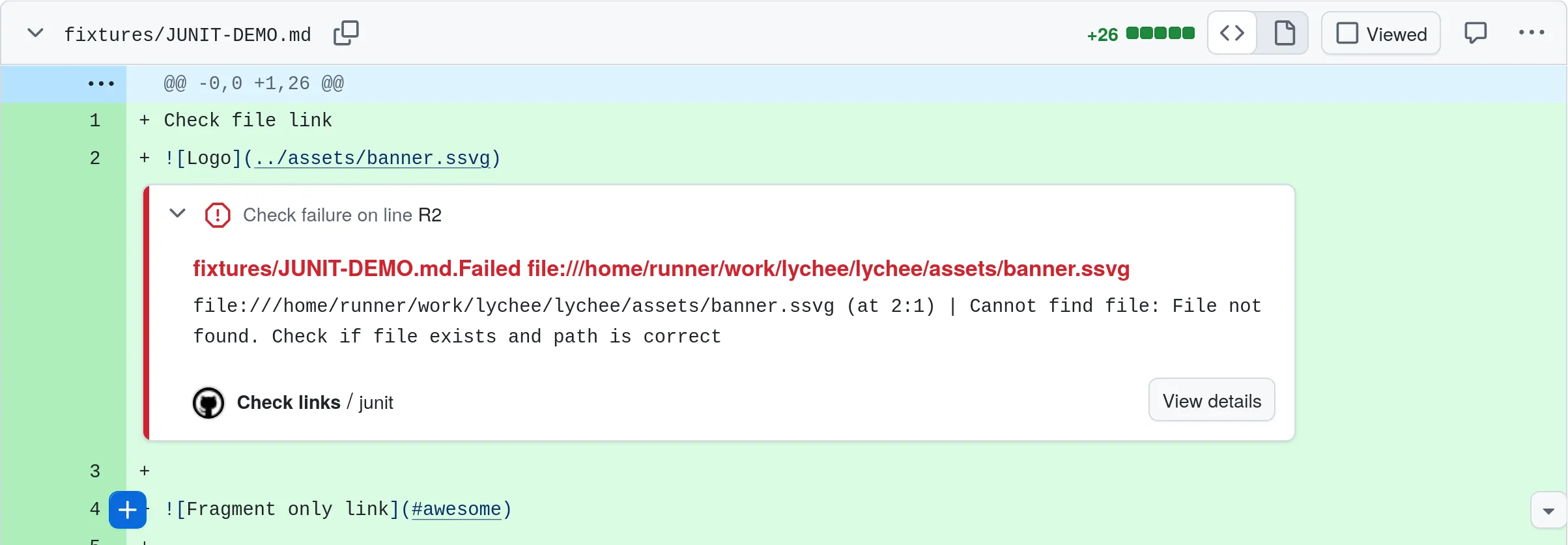
Section titled “Annotate link check errors”Using the junit format it’s possible to output the link check results
as a JUnit test report.
As shown in the below screenshot, this output can then be used
to annotate link check failures directly in the code of a pull request
using action-junit-report.
name: Check linkson:  pull_request:
jobs:  junit:    runs-on: ubuntu-latest
    steps:      - uses: actions/checkout@v4
      - name: Check links        id: lychee        uses: lycheeverse/lychee-action@v2        with:          fail: false # continue on failures          format: "junit"          output: "results.xml"
      - name: Publish link check report        uses: mikepenz/action-junit-report@v6        with:          report_paths: "results.xml"          annotate_only: true          fail_on_failure: true # only fail in the end
Caching
Section titled “Caching”Caching is a great way to speed up your CI/CD pipeline and
to reduce the number of requests performed.
Caching is achieved by providing the --cache flag
and reusing the .lycheecache file between consecutive runs.
Below is an example workflow that caches lychee results.
name: Check URLs with lychee
on:  push:
jobs:  linkChecker:    runs-on: ubuntu-latest    steps:      # Cache lychee results (e.g. to avoid hitting rate limits)      - name: Restore lychee cache        uses: actions/cache@v4        with:          path: .lycheecache          key: cache-lychee-${{ github.sha }}          restore-keys: cache-lychee-
      - uses: actions/checkout@v5
      - name: lychee URL checker        uses: lycheeverse/lychee-action@v2        with:          # arguments with file types to check          args: >-            --cache            --verbose            --no-progress            './**/*.md'            './**/*.html'        env:          # to be used in case rate limits are surpassed          GITHUB_TOKEN: ${{secrets.GITHUB_TOKEN}}
This pipeline will automatically cache the results of the lychee run. Note that the cache will only be created if the run was successful. If you need more control over when caches are restored and saved, you can split the cache step and e.g. ensure to always save the cache (also when the link check step fails):
- name: Restore lychee cache  id: restore-cache  uses: actions/cache/restore@v3  with:    path: .lycheecache    key: cache-lychee-${{ github.sha }}    restore-keys: cache-lychee-
- name: Run lychee  uses: lycheeverse/lychee-action@v2  with:    args: "--cache --max-cache-age 1d ."
- name: Save lychee cache  uses: actions/cache/save@v3  if: always()  with:    path: .lycheecache    key: ${{ steps.restore-cache.outputs.cache-primary-key }}
Fixing broken links with archived versions
Section titled “Fixing broken links with archived versions”David Gardiner wrote a series of blog posts about how he used lychee-action to replace broken links on his website with archived versions. The posts are a great example of how to use lychee-action together with other actions to achieve a specific goal. Thanks David for the great write-up!
To achieve this, David used the Wayback Machine Query Github Action to query for archived versions of broken websites. The results of the query were then fed into the Replace multiple strings in files action to update the files.
Here are the links to the blog posts which explain the process in more detail: